

— cursors
·
GUTENBERG-READY

CursorFlex.
CursorFlex lets you swap the boring default browser pointer with a modern custom cursor in seconds — no coding required.
· WORDPRESS > 6.0
· PHP 8+
· LIGHTWEIGHT
· NO CODE REQUIRED
— 01 · WHY CUSTOM CURSORS ?
A cursor that
finally looks like your brand.
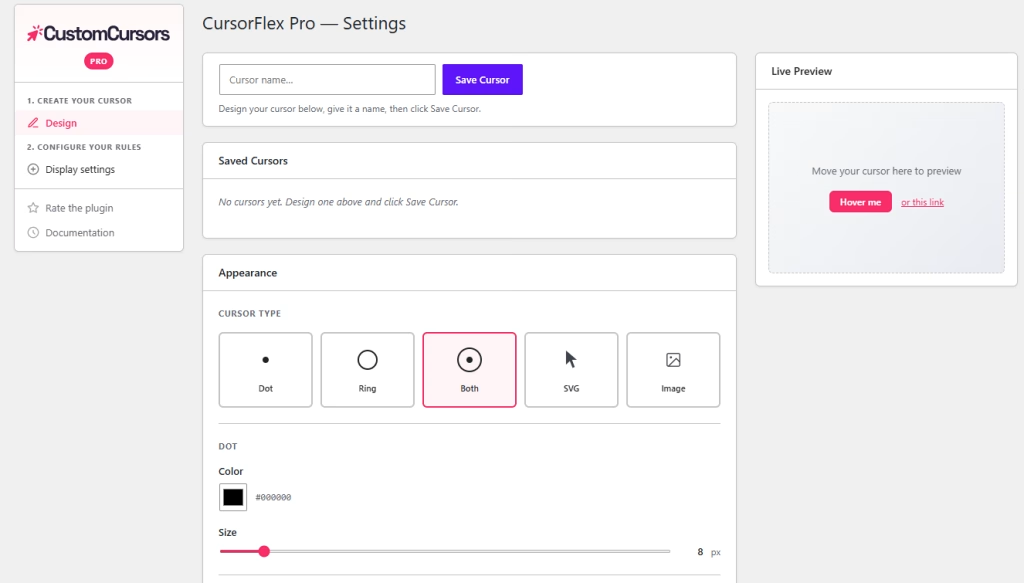
Replace the default browser cursor with a stylish dot, ring, or combination — fully customizable from your WordPress dashboard. Configure everything from a clean settings page with a live preview: pick a cursor style, adjust colors and sizes, and see the result instantly before saving.

Get your style
Dot, Ring, or both combined, SVG or your custom image, switch with a single click. Each style ships with sensible defaults and reacts instantly in the preview pane.

Independent color control
The dot and the ring get their own pickers, so you can match brand exactly — or use the ring as an accent and the dot as a contrast hit.

Live preview panel
A preview pane lives right inside the settings page. Tweak anything and see the result before you ever click Save.
— 02 · PRICING
Free, or Pro.
Choose your plan
Free
$O
/ forever
- Limited features
- Support on wp.org
- Lifetime updates
- Unlimited websites
BEST VALUE
Pro
$19
/ year
- All features available
- 1 year support
- 1 year updates
14 Days Money Back Guarantee! You are fully protected by our 100% Money Back Guarantee. if it’s requested within 14 days of purchase. See the dedicated refund policy section in our terms sales.
— 03 · free / pro comparation
Free, or Pro.
What’s difference ?
| CursorFlex Free | CursorFlex Pro | |
|---|---|---|
| Set transition on first user visit | – |  |
| Cursor styles & appearance | ||
| Dot, Ring or Both styles Three preset cursor shapes, switchable in one click. | | |
| Independent dot & ring colors A picker for each layer — match brand exactly. | | |
| Size & border-width sliders Dot size, ring size, ring border — three sliders, live updates. | | |
| Hide native browser cursor Toggle off the default pointer for a clean, single-cursor look. | | |
| Custom SVG / image cursor Upload your own glyph, logo or icon as the cursor. | – | |
| Smooth eased ring follow requestAnimationFrame-driven, jank-free on any device. | | |
| Cursor trail & effects Trailing dots and more effects | – | |
| Click effects Ripple, burst and particle effects on every click. | – | |
| General settings | ||
| Live preview panel Tweak settings and see the cursor update without reloading. | | |
| Per-page / per-category targeting Different cursors on different pages, posts or taxonomies. | – | |
| Cursor configurations How many saved cursor setups you can run side by side. | 1 | Unlimited |
— 04 · PLAYGROUND DEMO
Let’s try the free version,
With the WordPress playground
— 04 · FAQ
Questions,
answered straight.
The plugin auto-detects pointer capabilities — on phones and tablets where there is no real cursor, the native behavior is preserved and the custom cursor is skipped entirely.
That’s a Pro feature. The free version applies one global cursor; Pro adds per-page and per-category targeting from the same clean settings screen.
Yes. CursorFlex loads on the front-end via a single lightweight script and never touches your theme’s CSS — Gutenberg, Elementor, Bricks, classic themes, all good.
Make the pointer
part of the brand.
Install the free version in under a minute, pick a style, and ship a more polished site today.
Upgrade to Pro whenever you’re ready.